
Grusher Proxy Service
Working from build_352
As development of the new proxy module for Grusher is now in active progress, another important step has been taken toward building a truly flexible and scalable infrastructure.
Core Operating Principle
When Grusher needs to retrieve data via SNMP, it does not directly contact the network equipment. Instead, it sends an encrypted request to the Grusher Proxy. The proxy performs the SNMP operation on the server side and returns an encrypted response.
The proxy module will bring several key capabilities:
- Proxying SNMP (get/walk/set) and Ping requests to remote subnets
- Isolation of system components
- Improved scalability and the ability to balance load
- Simplified integration with external services
- Support for request caching, logging, and access control
Essentially, it adds an extra layer of abstraction that makes Grusher significantly more powerful.

Installing the Service with systemd
To run the Grusher Proxy Service reliably in the background as a systemd service on Linux, follow these steps:
1. Create the service file
sudo nano /etc/systemd/system/grusher-proxy-service.service
sudo nano /etc/systemd/system/grusher-proxy-service.service2. Insert the following content:
[Unit]
Description=Grusher SNMP and Ping proxy Service
After=network.target

[Service]
# Path to the binary and working directory (where grusher_proxy_config.json is located)
ExecStart=/opt/grusher_proxy/grusher-proxy-service
WorkingDirectory=/opt/grusher_proxy/

# Automatic restart on failure
Restart=always
RestartSec=3

# Logging
StandardOutput=append:/opt/grusher_proxy/log/snmp-service.log
StandardError=append:/opt/grusher_proxy/log/snmp-service.err

[Install]
WantedBy=multi-user.target
3. Manage the service
sudo systemctl daemon-reload                  # Reload systemd configuration
sudo systemctl enable grusher-proxy-service   # Enable autostart on boot
sudo systemctl start grusher-proxy-service    # Start the service
sudo systemctl stop grusher-proxy-service     # Stop the service
sudo systemctl restart grusher-proxy-service  # Restart the service
sudo systemctl status grusher-proxy-service   # Check service status
4. Setting proxy in Grusher
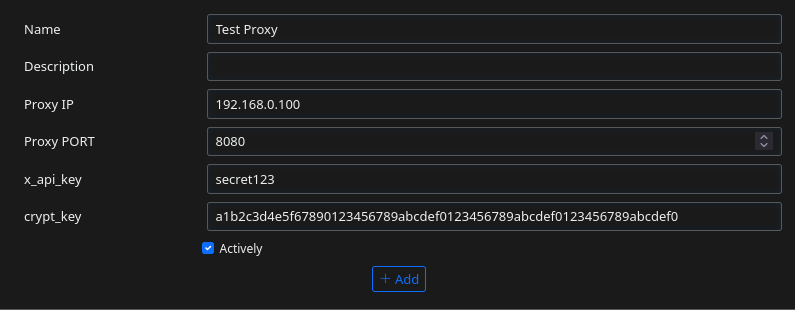
Go to http://GRUSHER_IP/system/proxies and setup like this
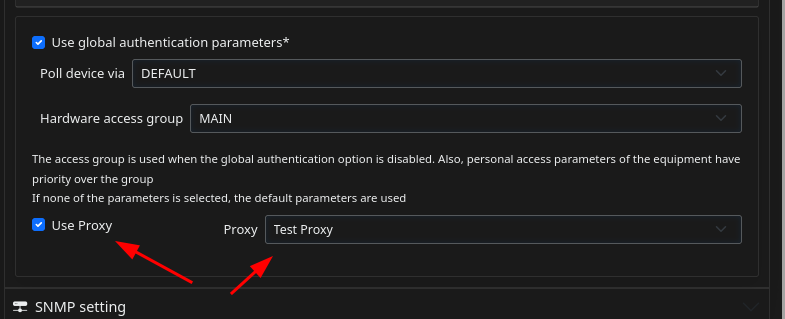
Set proxy in device card
Set your X_API_KEY
5. Setting proxy in service
Default proxy config
{
  "listen": ":8080",
  "x_api_key": "secret123",
  "shared_encryption_key": "a1b2c3d4e5f67890123456789abcdef0123456789abcdef0123456789abcdef0",
  "max_request_age": 60,
  "allowed_ips": [
    "127.0.0.1",
    "::1",
    "192.168.1.0/24"
  ],
  "rate_limit_rps": 1000,
  "burst": 20,
  "workers": 10,
  "queue_size": 1000,
  "cache_ttl": 10,
  "default_timeout": 5,
  "default_retries": 2,
  "log_file": "app.log"
}
Description
| Parameter | Type | Description | Recommended Value | Note |
|---|---|---|---|---|
| listen | string | Address and port on which the server listens (HTTP). | ":8080" |
Usually :8080 or :443 (for HTTPS) |
| x_api_key | string | API key for request authorization. Passed in the X-API-Key header. |
"secret123" |
Better to rename to api_key in config |
| shared_encryption_key | string | 32-byte key (64 hex characters) for AES-256-GCM encryption of requests and responses. | 64 hex characters | Very important. Do not commit |
| max_request_age | integer | Maximum request age in seconds (protection against replay attacks). Requests older than this are rejected. | 60 |
Recommended range: 30–120 seconds |
| allowed_ips | array | List of allowed IP addresses or subnets (supports CIDR notation). | ["127.0.0.1", "192.168.1.0/24"] |
Very important for security |
| rate_limit_rps | integer | Maximum number of requests per second (Rate Limit). | 30 – 100 |
Increase for heavy polling |
| burst | integer | Maximum number of requests that can be made in a short burst. | 50 – 100 |
Usually 1.5–2x higher than rate_limit_rps |
| workers | integer | Number of concurrent workers (goroutines) processing requests. | 10 – 30 |
Higher = better throughput |
| queue_size | integer | Size of the job queue (if all workers are busy, new requests wait here). | 500 – 2000 |
Larger value reduces rejection risk |
| cache_ttl | integer | Cache lifetime for responses in seconds (0 = cache disabled). | 5 – 30 |
Useful for snmp_get, less for walks |
| default_timeout | integer | Default timeout for a single SNMP request (in seconds). | 5 – 15 |
For walks, better to set 10–20 |
| default_retries | integer | Default number of retries if an SNMP request fails. | 2 – 3 |
Usually 2 is enough |
| log_file | string | Path to the log file. If empty - logs go to console. | "app.log" |
Recommended to specify |
For heavy polling (many ports), increase rate_limit_rps, burst, workers, and queue_size.
Download proxy
- v0.2 - Added AES-256-GCM encrypt support + replay-attack fix Download
- v0.1 - first release
Test run
Unpack to /opt/grusher_proxy/
cd /opt/grusher_proxy/
chmod +x grusher-proxy-service
./grusher-proxy-service
This setup ensures the proxy service starts automatically after system boot, restarts in case of failure, and keeps logs in the designated directory.
The new proxy module represents a major enhancement to the Grusher ecosystem, paving the way for more robust, secure, and scalable network monitoring and management.
No comments to display
No comments to display